
Artificial intelligence has revolutionized productivity tools, offering intelligent assistance that adapts to individual needs across academic, professional, and entrepreneurial contexts. AI-powered apps now handle scheduling, note-taking, writing, research, and project management with remarkable efficiency. This comprehensive guide explores leading solutions helping students master studies, professionals optimize workflows, and businesses drive growth through smarter task management and collaboration.
Why AI-Powered Productivity Apps Matter Today
Traditional productivity methods often fall short amid information overload and competing demands. AI tools analyze patterns, automate repetitive tasks, and provide personalized recommendations that enhance focus and output. For students, these apps streamline research and organization. Professionals benefit from time-saving features that reduce administrative burden. Businesses gain competitive edges through data-driven insights and streamlined operations.
The best applications combine intuitive interfaces with powerful backend intelligence, learning from user behavior to deliver increasingly relevant support. Many offer generous free tiers suitable for individuals, while premium features support team collaboration and advanced analytics. Selecting tools aligned with specific workflows maximizes benefits while minimizing learning curves.
Top AI Apps for Students: Academic Success Tools
Students juggle lectures, assignments, and exams while managing personal lives. Notion AI transforms note-taking and organization through intelligent summarization and database creation. Users upload lecture notes or readings, then ask the AI to generate study guides, flashcards, or timelines. The platform’s flexible structure supports everything from class schedules to research projects, helping maintain organized digital workspaces.
Grammarly’s AI writing assistant elevates academic papers and assignments. Beyond basic spelling and grammar checks, it suggests improvements in clarity, tone, and structure while detecting plagiarism risks. Students receive real-time feedback that strengthens writing skills over time, particularly valuable for non-native English speakers or those developing formal academic voices.
Otter.ai revolutionizes lecture capture and review. The app transcribes spoken content accurately, identifying speakers and generating searchable summaries with key action items. Students review discussions efficiently, focusing on understanding rather than frantic note-taking. Integration with popular learning management systems streamlines academic workflows further.
Essential AI Tools for Professionals: Workflow Optimization
Busy professionals require tools that reclaim time and reduce cognitive load. Reclaim.ai intelligently manages calendars by protecting focus time, scheduling deep work blocks, and suggesting optimal meeting times based on energy patterns and priorities. The AI learns from user habits, automatically rescheduling conflicts while respecting personal boundaries and work-life balance needs.
Microsoft Copilot integrates across familiar Office applications, offering context-aware assistance within Word, Excel, PowerPoint, and Teams. Professionals draft emails, analyze spreadsheets, generate presentations, or summarize meetings without switching applications. This seamless integration accelerates routine tasks while maintaining security standards required in corporate environments.
Perplexity AI serves as an intelligent research companion for professionals needing quick, cited information. The tool delivers concise, source-backed answers to complex queries, saving hours compared to traditional searching. Marketing teams, consultants, and analysts particularly value its ability to synthesize current data with clear references for reports and presentations.
Powerful AI Solutions for Businesses: Growth and Efficiency
Businesses leverage AI for strategic advantages in competitive markets. ClickUp AI enhances project management by generating task descriptions, summarizing updates, and suggesting workflow improvements. Teams collaborate more effectively as the AI identifies bottlenecks and recommends resource allocations based on historical performance data.
Lindy AI builds custom automation agents that handle repetitive business processes like email triage, appointment scheduling, or customer inquiry routing. Small businesses particularly benefit from these virtual assistants that scale operations without proportional staff increases. The no-code approach makes advanced automation accessible regardless of technical expertise.
Notion AI extends beyond individual use into team knowledge management. Companies create centralized wikis, automate meeting summaries, and generate reports from database entries. The AI understands context across workspaces, answering questions about company policies or project histories instantly. This centralized intelligence reduces information silos and accelerates onboarding for new team members.
Building an Effective AI Productivity Ecosystem
Success comes from combining complementary tools rather than relying on single applications. A typical stack might include Notion for organization, Grammarly for communication, Otter for meetings, and Reclaim for scheduling. Integration capabilities allow information to flow seamlessly between platforms, creating unified workflows.
Start by identifying primary pain points—whether time management, writing quality, research depth, or team coordination. Test free versions thoroughly before committing to premium plans. Provide team training when implementing business solutions to ensure adoption and maximize return on investment. Regular reviews of tool effectiveness help refine selections as needs evolve.
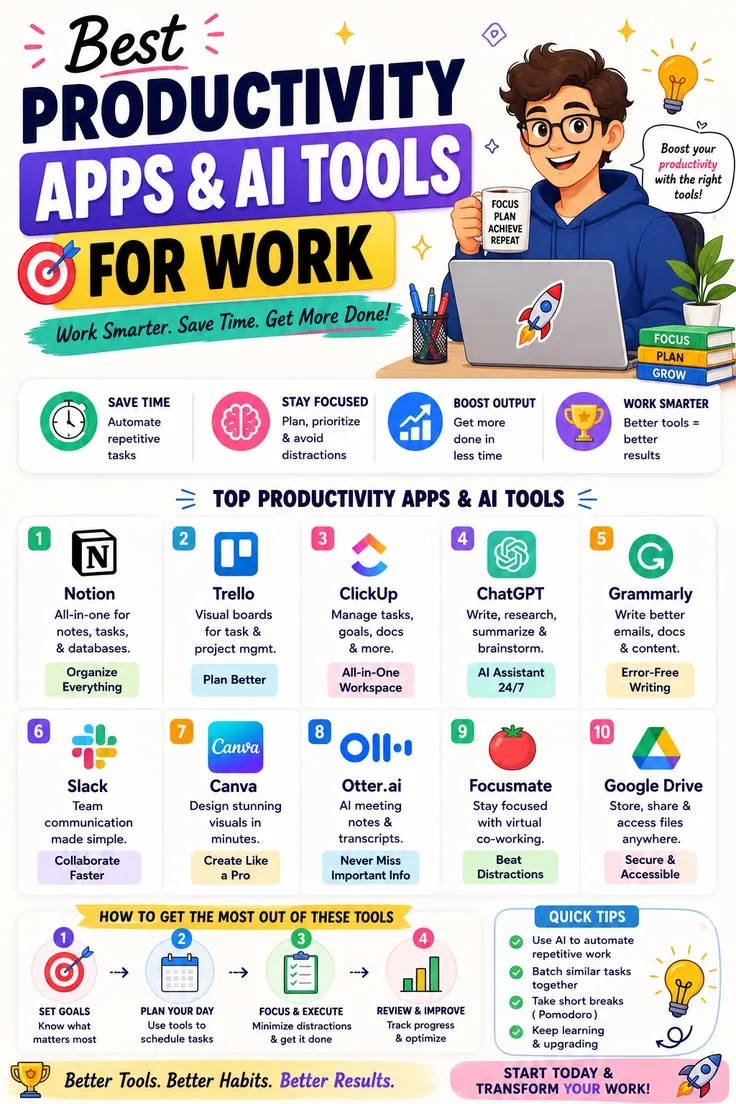
Best Practices for Maximizing AI Productivity Benefits
Clear prompting yields superior results across AI applications. Specific, contextual instructions produce more relevant outputs than vague requests. Review AI-generated content carefully, using tools as assistants rather than replacements for critical thinking. Maintain data privacy by understanding each application’s security protocols, particularly when handling sensitive business or client information.
Establish boundaries to prevent technology overload. Schedule focused work periods without constant AI assistance to preserve creative thinking and problem-solving abilities. Combine digital tools with traditional methods like handwritten notes or in-person discussions for optimal balance. Regular digital detox periods prevent burnout while maintaining human connections essential for collaboration.
Measuring Success and Continuous Improvement
Track productivity metrics before and after implementing AI tools to quantify improvements in task completion rates, time savings, and output quality. Solicit team feedback regularly to identify friction points or additional training needs. Many applications provide usage analytics that reveal optimization opportunities.
Stay informed about emerging features and new tools through industry publications and professional networks. The AI productivity landscape evolves rapidly, with innovations frequently enhancing existing capabilities. Periodic reassessment ensures tools continue serving current needs effectively while identifying opportunities for advancement.
The Future of AI-Powered Productivity
Advancements in natural language processing and machine learning will further personalize assistance, anticipating needs before users articulate them. Multimodal capabilities combining text, voice, and visual inputs will create more intuitive interactions. Integration across devices and platforms will blur boundaries between work and personal productivity tools.
Businesses and individuals adopting AI thoughtfully gain significant advantages in efficiency and innovation capacity. The technology augments human capabilities rather than replacing them, freeing cognitive resources for strategic thinking and creative problem-solving. Those who master these tools position themselves for success in increasingly competitive environments.
Conclusion: Transforming Productivity Through Intelligent Tools
AI-powered productivity applications offer unprecedented support for students mastering academics, professionals optimizing careers, and businesses driving growth. By selecting appropriate tools, implementing them strategically, and maintaining human oversight, users achieve remarkable efficiency gains while preserving creativity and well-being.
Begin with one or two applications addressing immediate needs, then expand gradually as comfort and value increase. Focus on integration and consistent usage rather than collecting numerous tools. The most successful users treat AI as collaborative partners enhancing human strengths. Embrace these intelligent solutions to work smarter, achieve more, and create space for what matters most in professional and personal life.
Read more – amherstdelivery.com